
If you are in immediate danger, also contact the emergency services. Aegixo gets your location to campus security quickly, but it cannot guarantee a response time.
Send it
- On the Home screen, find the red Slide for SOS bar.
- Drag the handle most of the way across the bar. If you let go too early it snaps back, so an accidental touch never sends an alert.
- Aegixo grabs your location and sends it to your campus security team.
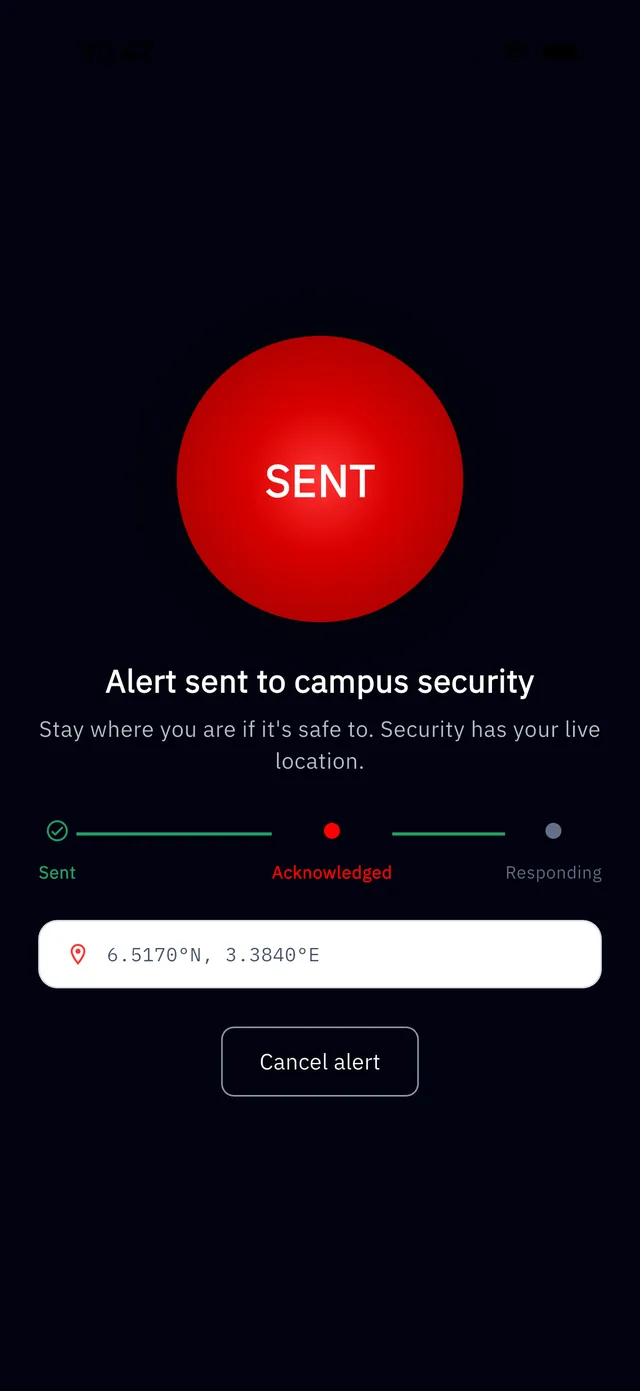
What you will see
- The message Alert sent to campus security, with your coordinates.
- Progress steps. Sent means it reached us; Acknowledged means a responder has seen it.
- A Cancel alert button, if you sent it by mistake.
While you wait
- Stay where you are if it is safe to. Security has your live location.
- Keep the app open. Aegixo keeps sending your location updates for as long as the alert is active.
- If you can, call campus security or the emergency services too.
Requirements
You need an active subscription, location permission, and a connection. With no connection, see Sending an SOS with no signal. If it will not send, see My SOS will not send.
Tapping SOS to test it creates a real alert, so please do not use it as a test. See our Acceptable Use Policy.